

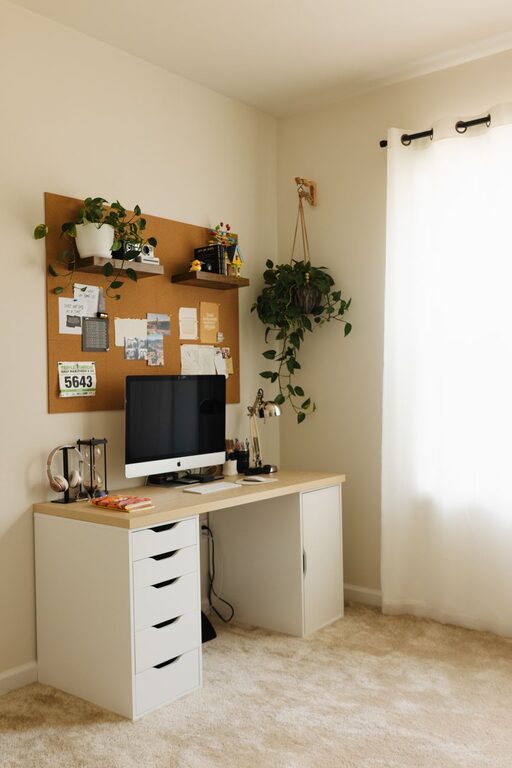
Creating a home workspace that feels cozy and functions well is essential for anyone working remotely or managing tasks at home. When your workspace supports productivity and comfort, it’s easier to stay focused and motivated throughout the day. In this post, we’ll explore practical tips to help you design a home office that feels inviting and meets your work needs.
Choose the Right Location
Finding the best spot for your workspace is the first step. Ideally, pick a quiet area with minimal distractions and enough natural light. A corner in your living room, a spare bedroom, or even a section of your kitchen can work well.
– Consider natural light: Position your desk near a window. Natural light reduces eye strain and improves mood.
– Minimize noise: Select a location away from busy areas if possible. Noise-canceling headphones can also help.
– Space availability: Make sure the spot has enough room for your desk, chair, and any other essentials.
Invest in Comfortable and Supportive Furniture
Comfort plays a major role in how well you work at home. A good office chair and desk can prevent discomfort and long-term health issues.
– Ergonomic chair: Choose one with adjustable height, lumbar support, and comfortable padding.
– Desk size: Select a desk that fits your equipment while leaving room to work comfortably.
– Standing options: Consider a sit-stand desk to vary your position during the day.
Optimize Lighting for Comfort and Productivity
Good lighting reduces eye strain and keeps you alert.
– Layer your lighting: Use a combination of ambient (overhead) light and task lighting like desk lamps.
– Adjust brightness: Use bulbs with adjustable brightness or add dimmers to control the intensity.
– Reduce glare: Position your monitor perpendicular to windows to avoid glare on the screen.
Keep the Space Organized and Clutter-Free
An organized workspace helps your mind stay clear and focused.
– Use storage solutions: Shelves, drawers, and boxes keep supplies tidy and accessible.
– Declutter regularly: Remove items that aren’t essential to work to avoid distractions.
– Organize cables: Use cable organizers or clips to keep cords neat and prevent tangling.
Personalize Your Workspace
Adding little touches that reflect your style can make your workspace feel cozy and inviting.
– Add plants: Greenery boosts mood and improves air quality.
– Incorporate personal items: Photos, artwork, or meaningful decor can make the space feel more welcoming.
– Choose calming colors: Soft, neutral tones or your favorite colors can create a relaxing atmosphere.
Maintain Good Air Quality and Temperature
Your workspace should be comfortable year-round.
– Ventilation: Regularly open windows or use an air purifier.
– Temperature control: Use fans, heaters, or humidifiers to keep the temperature comfortable.
Establish Boundaries and Organization Habits
Creating routines and boundaries helps your workspace serve its purpose.
– Set work hours: Define when you start and stop working to separate work from home life.
– Use a calendar or planner: Keep track of tasks to stay organized.
– Limit non-work use: Try to reserve your workspace exclusively for work to keep it functional.
Add Technology That Supports Your Work
The right tools make your workday smoother.
– Reliable internet: Ensure your connection is fast and stable.
– Ergonomic accessories: Consider an external keyboard, mouse, or monitor to reduce strain.
– Noise control: Use headphones or white noise apps to maintain focus.
Final Thoughts
Designing a cozy and functional home workspace involves thoughtful planning and small personal touches. By focusing on comfort, lighting, organization, and personalization, you can create an environment that supports your productivity and well-being. Take the time to adjust your space as your needs change, making it a true home for your work.